

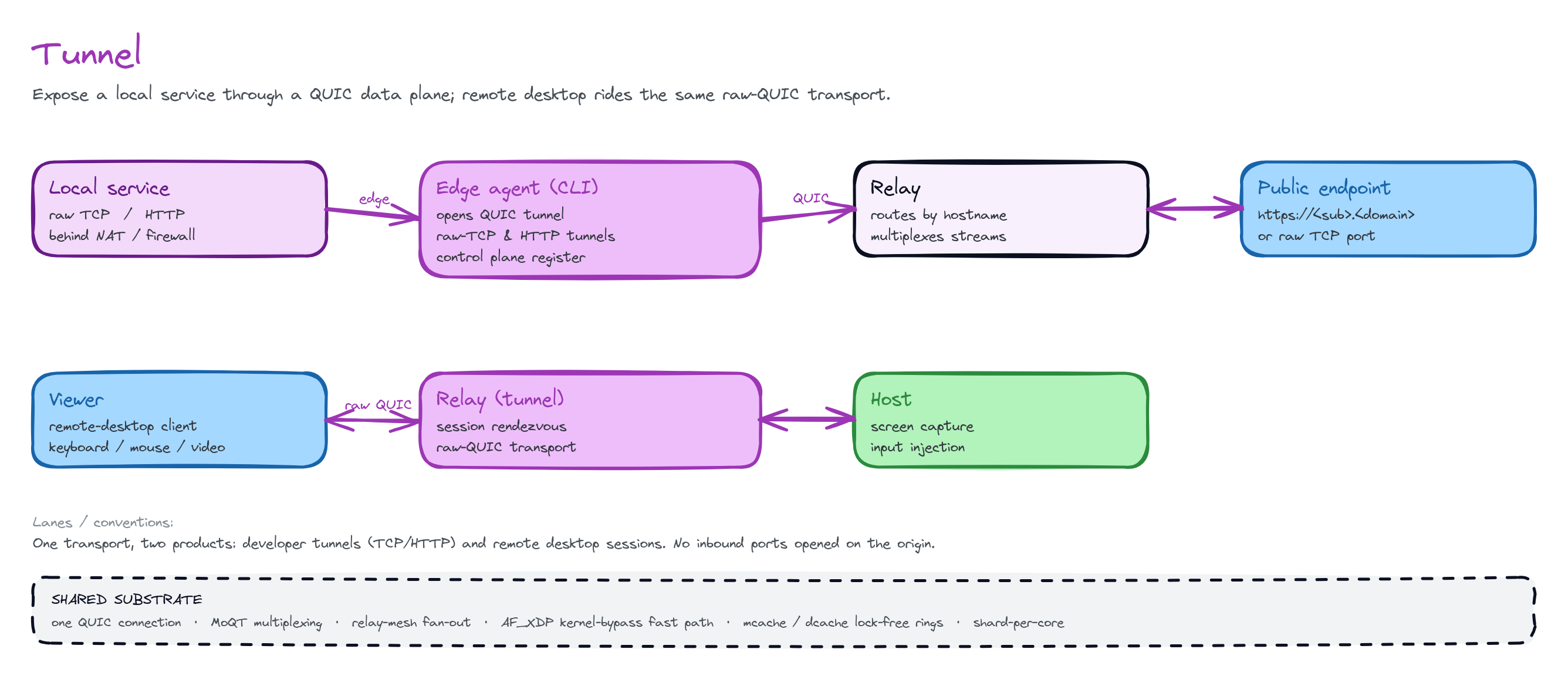
A local service reaches the public internet over a QUIC tunnel. The client dials out. The edge routes inbound traffic back over parked streams.
localhost:3000, or at any
internal TCP/HTTP service, and get a public URL. Your box dials out to the
nearest edge. The edge routes public requests back over that connection to your
service. The same primitive gives you single-command public URLs, direct
peer-to-peer LAN/WAN links, and remote-desktop sessions.
The tunnel modality ships today as the
clutchcall CLI plus a QUIC
data-plane engine. It does not ship as a typed SDK class. This page documents
the wire model and the CLI. A programmatic client is marked Preview where
it appears.What you can build
Public URL for localhost
Demo a web app, receive a webhook, or share a dev server. One command gives
you a public HTTPS URL. You do not set router config or open an inbound
port.
Zero-trust ingress
Reach an internal service (a database, an admin panel, SSH) from anywhere.
You do not open a hole in the firewall. The box only dials out.
Direct P2P links
Two boxes connect directly. On the same LAN, they use discovery. Across
NATs, they use hole punching. The edge brokers candidates but never carries
bytes.
Remote desktop
QuickDesk rides the same raw-QUIC
transport. The controlled box registers a slug and parks streams. The
controller dials it by slug.
Why no inbound ports
You never open a firewall port, and you do not need a static public IP. Your box is always the QUIC client. Because it dials out, NAT traversal is free. The box establishes the connection from behind the firewall. The edge routes return traffic back over it.- One public connection ⇄ one QUIC stream. Each tunneled connection rides its own QUIC stream. Thus there is no head-of-line blocking across tunnels. That blocking is the classic pain of a single multiplexed TCP tunnel.
- Survives network flaps. QUIC connection migration / resume lets the box change networks (Wi-Fi → cellular) without dropping the public URL.
- Multi-region by mesh. A box connects to its nearest PoP. When public traffic lands on a different PoP, the edge↔edge mesh routes it to the box’s PoP. Thus the URL is reachable from every region, and the box does not re-home.
Wire model — the parked-stream pool
A QUIC server cannot open streams toward a client. Only the client opens streams. So the box pre-opens a pool of bidirectional streams and parks them. When a public request arrives, the edge pops an idle parked stream. It writes a small metadata frame onto the stream. It then splices the public socket to that stream.1
Register
The box dials the edge over QUIC (ALPN
clutchcall-engine). It
opens a control stream and sends a reg frame with its desired slug
and a session token. The edge claims the slug. It replies reg_ok with the
public host.2
Park a pool
The box pre-opens
K (≈16) bidi work streams and parks them idle. Each
stream carries a one-shot park marker to the edge, so the server sees it.3
Public request arrives
A request hits
https://<slug>.clutchcall.dev. The edge strips the host to
the slug. It looks up the session and pops an idle parked stream.4
Splice
The edge writes an
open metadata frame (remote addr, host, scheme) onto
the stream. It then becomes a transparent byte relay between the public
socket and the stream. The box reads the frame and dials
localhost:<port>. It relays bytes in both directions until either side
closes.5
Refill
Each time the edge consumes an idle stream, the box opens a replacement to
keep
K streams parked. The control stream also carries heartbeats and
pool-low requests.Frame format
The control and metadata frames are length-prefixed JSON. The data path after the metadata frame is raw bytes.
An empty
slug means “assign me a random memorable slug”. This is the default
with the least friction. The session token is a short-lived JWT. It carries the
user id, the device id (for the device gate), and the plan. The edge checks the
token on reg.
Tunnel types
HTTP / HTTPS tunnel
HTTP / HTTPS tunnel
The headline type. The edge terminates public TLS. It routes by
Host
header / SNI to the registered slug. It bridges each public connection onto
a parked stream. WebSocket upgrade, SSE, and chunked transfer pass through
cleanly, because each public connection is its own stream. Wildcard TLS
covers *.clutchcall.dev, so every slug gets automatic HTTPS.Raw-TCP tunnel
Raw-TCP tunnel
A remote port maps straight to a local TCP service, for example SSH,
Postgres, or a game server. There is no HTTP parsing. The edge allocates or
routes a public port. It splices each accepted TCP connection onto a parked
stream as an opaque byte pipe. Each stream honors backpressure: the read
side pauses when the peer cannot take more.
P2P direct (LAN + WAN)
P2P direct (LAN + WAN)
Two boxes link directly. The edge stays out of the byte path. On the
same subnet, discovery uses mDNS (a
_clutchcall._udp.local
service), and the boxes dial over the LAN.
Across NATs, each side gathers its reflexive candidate with STUN. It
publishes the candidate to a rendezvous keyed by a shared pair-id. Both
sides then punch, and the QUIC engine rebinds the same port.
Endpoint-independent (cone) NATs work directly. Symmetric NATs fall back to
the relayed path.Remote desktop — QuickDesk
Remote desktop — QuickDesk
QuickDesk is our self-hosted
remote-desktop product. It runs its transport over this same raw-QUIC
relay. The controlled box registers its device id as a slug
(
"proto":"quick") and parks streams. The controller dials it by slug.
QuickDesk’s own framing and end-to-end encryption ride unchanged on top.
The edge is untrusted and only secures the hop. See the
QuickDesk docs for clients, self-hosting,
and the operator console.Control plane vs data plane
The CLI is the front end. It does two different things:
Sign-in is a provider device flow. The provider hosts the UI. The product
stores no credentials. It persists only a short-lived session JWT plus a
device id locally (file mode
0600). That one session token authorizes tunnels
and spend. The CLI presents it to the data plane on reg.
Lanes & QoS
The tunnel data path is reliable and ordered end to end. Each tunneled TCP or HTTP connection is a single QUIC stream, so bytes arrive in order with no loss. There is no lossy datagram lane here, unlike voice or games. A tunnel is a faithful byte pipe. Stream multiplexing isolates the tunnels: one slow or stalled connection cannot head-of-line-block another.How it works
You get low-latency ingress and high per-edge capacity because the edge handles public traffic on a fast path, not on a general-purpose stack. Each edge runs a shard-per-core reactor with a kernel-bypass NIC fast path and io_uring for async I/O. Cross-shard hand-offs use lock-free rings. The public QUIC listener uses SO_REUSEPORT, so each shard owns an accept queue. Your URL stays reachable from every region. The slug → session routing table changes at runtime as boxes connect and disconnect. The edge mesh shares the table (Redis membership), so any PoP can route a public request to the PoP that holds your box.Related
- SDK methods — the
clutchcallcommand surface and config - Cookbook — task-oriented snippets
- Recipes — end-to-end worked examples